SelfPublish Pilot turns Amazon listings, reader reviews, bestseller charts, and niche articles into book ideas, outlines, titles, descriptions, keywords, and launch assets without copying, prompting, or leaving the page. Read this ultimate SelfPublish Pilot review before you buy.
SelfPublish Pilot Review 2026: Best Browser Extension to Turn Amazon Research Into Book Assets Fast
SelfPublish Pilot turns the Amazon listings, reader reviews, bestseller charts, and niche articles you already read into book ideas, outlines, titles, descriptions, keywords, and launch assets — without copying, prompting, or leaving the page. That is the whole pitch in one breath, and it is worth sitting with for a second. Most self-publishers already spend hours browsing competitor pages, scanning one-star reviews, and skimming bestseller lists. The problem is not a lack of research. The problem is that none of that research turns into a usable draft until you open a separate AI tab, paste a messy pile of notes, write a prompt from scratch, and hope the output is close enough to use.
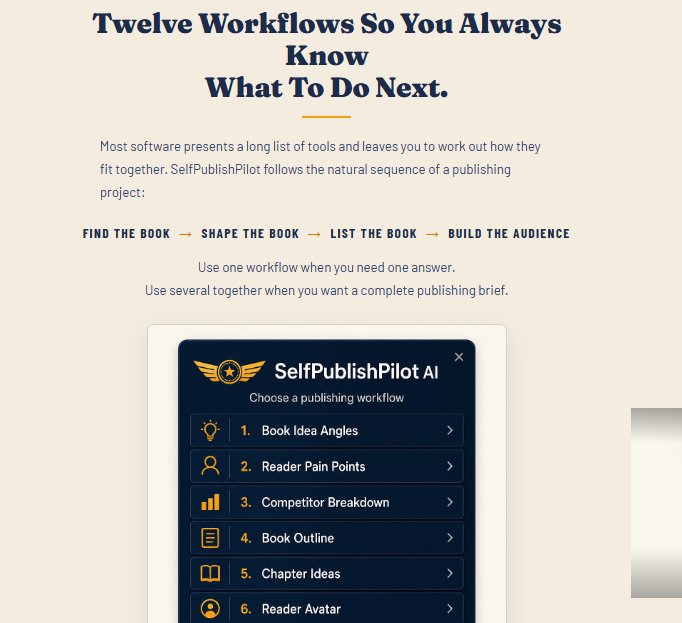
SelfPublish Pilot is a browser extension built specifically for KDP authors who are tired of that loop. You highlight text on whatever page you are already reading — a competitor description, a stack of reader reviews, a niche article — and click one of 12 built-in publishing workflows. The extension sends that highlighted content, plus a pre-written set of KDP-specific instructions, to your own OpenAI or Anthropic account. What comes back is a structured result you can actually use: ten book idea angles, an 8 to 12 chapter outline, a first-draft Amazon description, seven backend keywords under the 50-character limit, or a ready-to-edit launch email.
It does not write the full manuscript for you. It does not replace your judgment about what book is worth publishing. What it does is collapse the research-to-asset gap that eats most of a new author’s time before a single word of the actual book gets written. Every buyer also gets BookPromoPilot AI free, a second extension with 12 more workflows for marketing after the book is live. Together that is 24 tools in one purchase, plus a built-in trademark guardrail that steers output away from brand names, celebrities, and protected titles before they land in your title box or keyword field.

What Is SelfPublish Pilot?
SelfPublish Pilot is a browser extension made for Amazon KDP authors, self-publishers, and first-time book creators. Instead of a blank prompt box, you highlight research on any webpage and run a one-click workflow. The extension uses your own connected AI account and returns a structured publishing asset built from the content you selected.
It is not a full writing platform. It is a research-to-asset layer that sits on top of the pages you already visit while planning a book. That design choice is what separates it from general chat tools that force you to rebuild context every time you open a new conversation.
This makes SelfPublish Pilot relevant for:
-
KDP authors researching new book ideas
-
First-time self-publishers who need structured help
-
Nonfiction creators turning market research into outlines
-
Marketers planning reader magnets and launch emails
-
Anyone tired of rewriting the same AI prompts for every project
SelfPublish Pilot Features List
12 Core Publishing Workflows
One-click tools for book ideas, outlines, titles, descriptions, keywords, and launch assets.
Highlight-to-Generate Workflow
Select text on any page, click a workflow, and get a structured result without writing a prompt.
Book Idea Angles
Turns research into ten distinct book directions from a single source.
Reader Pain Points and Competitor Breakdown
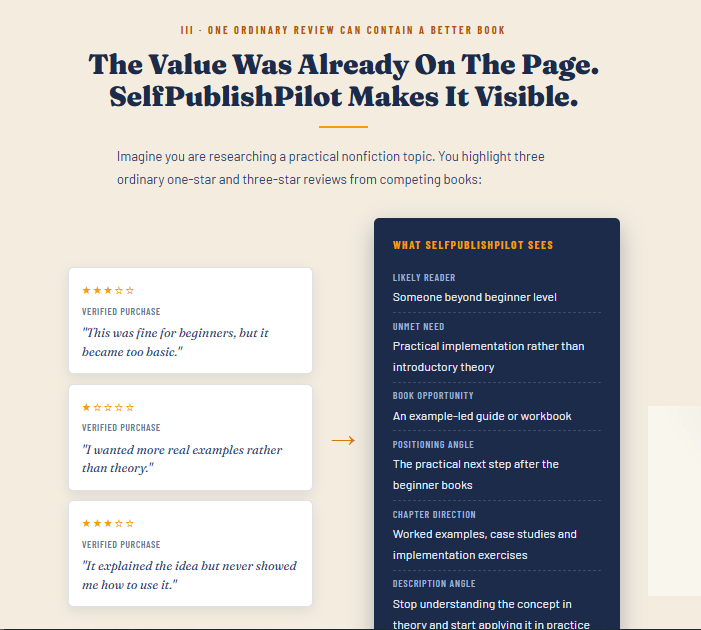
Maps frustrations from reviews and teardowns of competing titles.
Book Outline Builder and Chapter Ideas
Produces an 8 to 12 chapter outline plus extra chapter options when you get stuck.
Title, Subtitle, and Description Tools
Generates title options and a first-draft Amazon book description ready to edit.
Keyword and Category Finder
Returns seven backend keywords under the 50-character limit, buyer search phrases, and category picks.
Reader Magnet and Launch Email Tools
Creates lead-magnet concepts and a full launch email with subject line options.
Trademark Guardrail
Steers every workflow away from brand names, celebrities, and protected titles.
Free BookPromoPilot AI Bonus
A second extension with 12 more marketing workflows included at no extra cost. Check Detail Inside!

What Is Inside the SelfPublish Pilot Package
When you get access to SelfPublish Pilot, you typically receive:
-
SelfPublish Pilot browser extension with 12 core KDP workflows
-
Free BookPromoPilot AI extension with 12 marketing workflows
-
Built-in trademark guardrail on every workflow
-
Ability to create unlimited custom workflows of your own
-
Installation walkthrough for major browsers
-
Commercial use of the assets you generate
-
One-time purchase with no monthly fee for the core tool
-
30-day money-back guarantee
You will need your own OpenAI or Anthropic API key. Usage is pay-as-you-go on your AI account, which keeps the extension itself free of a recurring platform fee.
SelfPublish Pilot Video DEMO
SelfPublish Pilot demo or review video here — watch the full walkthrough: highlighting an Amazon listing, running Book Idea Angles, generating a competitor breakdown from reviews, creating an Amazon description, pulling keywords and categories, and building a custom workflow from scratch.
How SelfPublish Pilot Works
Step 1: Install the extension.
Add SelfPublish Pilot to Chrome, Edge, Opera, Firefox, or Brave and connect your OpenAI or Anthropic key.
Step 2: Do your normal research.
Browse Amazon listings, bestseller charts, reader reviews, or niche articles the way you already do.
Step 3: Highlight the useful text.
Select a description, a cluster of reviews, an article section, or any research that sparks an idea.
Step 4: Pick a workflow.
Click the extension icon and choose the publishing task you need right now.
Step 5: Review and edit the output.
Get a structured draft — ideas, outline, title options, description, keywords, or launch email — then refine it.
Step 6: Move to the next stage.
Use the same research trail to build the book, list it on KDP, and promote it with BookPromoPilot AI.

SelfPublish Pilot OTO Upgrade Path
Like many launches of this kind, SelfPublish Pilot may include optional upgrades after the front-end purchase. None of these are required to use the core extension.
OTO 1 — Unlimited or Pro Edition
Removes usage limits and expands workflow capacity for high-volume publishers.
OTO 2 — DFY Publishing Pack
Ready-made templates, checklists, or niche starter packs for faster launches.
OTO 3 — Advanced Marketing Suite
Extra promotion workflows beyond the free BookPromoPilot AI bonus.
OTO 4 — Agency or Commercial Expansion
Broader rights for freelancers and agencies handling client book projects.
OTO 5 — Training and Traffic Add-Ons
Deeper publishing training, traffic methods, or launch playbooks.
Front-end pricing has been listed around $27 with a launch coupon, against a regular price near $37, as a one-time payment. Always confirm the live checkout figures before buying, since launch pricing can change.
Why SelfPublish Pilot Is Perfect for You
Most AI writing tools make you start from zero every time. You open a chat, explain your niche, paste research, write a careful prompt, and still get something you have to rebuild for the next task. SelfPublish Pilot removes that reset. Because the workflow already knows what a KDP description, outline, or keyword set should look like, you only need to feed it the research you are already staring at.
That is a real time saver for people who publish more than one book a year. The trademark guardrail also matters more than it sounds. A lot of new authors accidentally lean on protected names in titles and keywords. Catching that early is cheaper than fixing a blocked listing later.
Who Is SelfPublish Pilot For?
SelfPublish Pilot is built for people who already research markets and want that research to turn into usable publishing assets faster.
-
KDP authors planning new titles from competitor and review research
-
First-time self-publishers who need structure without a full course
-
Nonfiction creators turning niche articles into outlines and listings
-
Book marketers building reader magnets and launch emails
-
Freelancers supporting clients through the pre-writing and listing stages
How to Make Money With SelfPublish Pilot
Publish your own books faster.
Use the workflows to move from research to listing assets without stalling for weeks.
Validate ideas before you write.
Test angles, pain points, and titles against real market language before committing to a full manuscript.
Offer listing optimization as a service.
Help other authors improve descriptions, keywords, and categories for a fee.
Build reader magnets that grow your list.
Create lead magnets tied to your book niche and convert readers into email subscribers.
Package launch assets for clients.
Deliver outlines, descriptions, and launch emails as part of a done-for-you publishing package.
Frequently Asked Questions
What is SelfPublish Pilot?
It is a browser extension that turns highlighted research on any webpage into structured KDP publishing assets through 12 one-click workflows.
Do I need to write prompts?
No. Each workflow already includes the publishing instructions. You highlight text and click.
Which AI account do I need?
You connect your own OpenAI or Anthropic API key. Usage is billed on your AI account as pay-as-you-go.
Does it write the full book?
No. It helps with ideas, outlines, titles, descriptions, keywords, and launch assets. The manuscript is still yours to write or produce.
What is BookPromoPilot AI?
It is a free bonus extension with 12 additional marketing workflows for promoting books after they are live.
Is there a monthly fee?
No monthly fee for the core tool. You only pay your normal AI API usage.
Is there a refund option?
Most launch offers include a 30-day money-back guarantee. Check the current checkout terms.
Do I have to buy the OTOs?
No. The front-end extension and free bonus are usable on their own. OTOs are optional upgrades.
Final Thoughts
Self-publishing gets stuck in the gap between research and a real draft. SelfPublish Pilot closes that gap by sitting on the pages you already read and turning highlighted research into outlines, titles, descriptions, keywords, and launch assets in one click.
If you are tired of rebuilding the same context in a blank chat window every time you plan a book, this is a cleaner way to work. Install it, highlight what matters, and move from research to ready-to-edit assets without leaving the page.

